Try seeing every technician's schedule and your real available hours, broken down by day or week or month. There's no clean way to do it with most PSAs. And that's the actual problem.
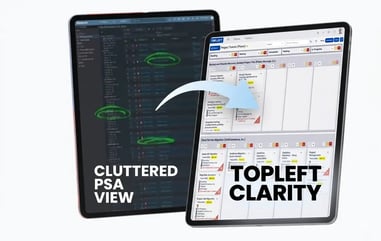
So MSP owners keep running this comparison, because both tools say they fix it. TopLeft hands your team a live Kanban view. Who's drowning, what's stuck, where the next project slot opens up. Everything syncs back to ConnectWise, Autotask, or HaloPSA. No typing the same thing twice.
Here's what you're actually buying. Day-to-day visibility that pulls technicians to open the board without being told. Capacity planning, so you know when the next project can kick off and you skip the mental math. Plus, onboarding is shaped around your team's size and the way they actually work, which means the methodology sticks rather than crumbling somewhere around week three.
.png?width=598&height=211&name=Pic%201%20(Moovila%20and%20TopLeft%20Diagram).png)
TopLeft Vs. Moovila: What Each Tool Actually Does
Features Comparison
| Feature | TopLeft | Moovila |
|---|---|---|
| Deep PSA integration (ConnectWise, Autotask, HaloPSA) | Bidirectional for both service tickets and projects | Bidirectional, project-focused with Smart Schedule layering service ticket and calendar data |
| Kanban boards and WIP limits | Yes, included on all plans | No |
| Real-time capacity view (who's overloaded, who has room) | Visual heatmaps and weekly hour tracking | Resource management dashboard plus Smart Schedule |
| Skill-based assignment from PSA data | Yes | Yes |
| Gantt charts | Yes | Yes |
| Service delivery ticket management on a daily workflow board | Yes | No |
| AI-driven scheduling and critical path automation | No | Yes (RPAX engine) |
| Onboarding matched to team size | Launch (under 10 users) and Optimize (10+ users), plus Accelerator group coaching and Discovery Project diagnostics | Customer Success-led, not segmented by team size |
| Time entry direct from board to PSA | Yes | Yes (built into work tickets) |
| Client portal with shared board visibility | Yes | No |
| Workflow automation | Yes | Yes |
| Portfolio management | Yes | Yes |
| 3-month paid pilot | Yes | Yes |
| Free trial | No (paid pilot) | No (demo only) |
Moovila: What it does well
.png?width=345&height=105&name=Pic%202%20(Moovila%20Logo).png)
Moovila's strength is its scheduling intelligence.
The RPAX engine monitors your project portfolio in real time, identifies critical path conflicts before they become delays, and surfaces remediation steps. If you change a task assignment and it creates a cascade of downstream schedule problems, Moovila flags it immediately.
The Smart Schedule module pulls in service tickets, calendar events, and project commitments to predict scheduling conflicts before they happen. The resource management dashboard connects in-flight projects, sales opportunities from your CRM, team calendars, and skill data to give you a composite capacity picture.
You can model scenarios: what if you lost this engineer, what if you added three SQL specialists. The interactive budget controls let you validate resource allocations before committing.
For PMOs managing complex, multi-phase projects with a lot of dependencies and a need for algorithmic risk monitoring, Moovila's automation depth is real.
What Moovila doesn't do as well
It doesn't give your technicians a daily Kanban workflow surface.
Moovila's Smart Schedule pulls ticket data in to inform scheduling decisions, but there's no visual board for techs to drag a ticket from Doing to Done, no WIP limits to stop the multitasking spiral, no Dispatch View for coordinators to assign unassigned work in real time. The surface Moovila optimizes for is the planner and the PMO, not the engineer mid-day.
If your MSP's capacity problem includes the reactive ticket queue eating into project hours, and for most MSPs it does, Moovila lets you see it from the scheduling layer but not manage it from a daily workflow layer. The double-entry problem doesn't go away. It shifts.
There's also a layer of algorithmic dependency to weigh honestly. When the AI flags something or shifts a schedule, you're waiting on the system to tell you what to do rather than seeing it yourself and adjusting. When your team doesn't trust the logic driving the schedule, adoption stalls and people drift back to the PSA.
Who Moovila is for
Teams with a dedicated PMO function, complex project portfolios with heavy dependency mapping, and a service desk operation where having a separate daily workflow tool is acceptable.
Organizations where the capacity problem is primarily a project scheduling and resource forecasting problem, not a service-delivery-plus-project problem that needs one shared daily surface.
TopLeft: What it does well
.png?width=368&height=91&name=Pic%203%20(TopLeft%20Logo).png)
Service tickets and project tasks land on one board, pulled live from your PSA.
It hooks straight into ConnectWise, Autotask, or HaloPSA, and it runs both directions. So instead of updating the PSA and then re-entering the same thing somewhere else, your team sees every service ticket and project sitting on a single board.
PSA's still your system of record. TopLeft just makes it readable.
Capacity planning specifically
Take each engineer. TopLeft stacks their assigned project hours against the hours they've actually got free that week. The heatmaps light up: red means buried, green means there's room.
Vacation, training, internal meetings, you can account for all of it. Then drag projects around and test schedules before anything touches the PSA. Nothing commits until you say so.
The day-to-day surface
Coordinators get the Dispatch View. It's their own interface for spotting unassigned work and routing it, and nobody has to schedule a meeting to do it.
Ever watched a tech juggle fifteen tickets at once? That's where service desks quietly fall apart. WIP limits stop it before it starts.
And the Client Portal? You share a board straight with a client, they watch progress in real time, no PSA login and no status call required.
Onboarding treated like a consulting engagement, not a software rollout
Every TopLeft subscription includes implementation help, and it's built around your PSA, your headcount, and the way your people actually do their jobs. You're not just paying for board access. You're paying for the methodology coaching that keeps the board alive. Most tools skip that step entirely. It's exactly why their adoption dies by week three.
Four programs, each one matched to where your team actually sits:
- Launch fits teams under 10 just getting going with TopLeft. You get four CSM-led sessions over four weeks: board setup, training the team, coaching on the daily huddle, and a wrap-up Q&A. The point is everybody adopts it together. Not just whoever clicked the setup button.
- Optimize is built for teams of 10 and up, the ones with several departments and tangled workflows. Per-team deep dives. Pull-based flow design. Coaching on the daily standup, then check-ins at 30 and 90 days. If you're an MSP where service, projects, dispatch, and NOC all have to share one surface, this is your program.
- Accelerator Group Coaching runs as weekly group sessions for your Project and Service Managers. You're in the room with peers from other MSPs wrestling the same problems, and there's guided accountability every single week. It's what comes after the rollout, once the question stops being "how do we get the board running" and becomes "how do we keep getting better at this."
- Discovery Project is a 30-day diagnostic on how you deliver projects, and our founder & long-time MSP owner, Wim Kerkhoff, runs it himself. He digs through your raw PSA data, your dashboards and reports, talks with your team, and hands back findings with a 12-month roadmap. What it really does is uncover the capacity already hiding in your shop, before you change a single thing operationally.
Not sure which one's right? The team picks a path for you, weighing your size, your PSA, and what you're after. Most MSPs kick off with Launch or Optimize, then bolt on Accelerator after the boards are up and running.
Real results from MSPs who've been exactly where you are now
- Steve at TEBA got project delivery moving 58.4% faster inside six months.
- Te'neyl doubled revenue with the same team she already had. No new hires.
- Chase at Appalachian Network Services took SLA compliance from 60% to over 90% within six months.
These aren't massive enterprise rollouts. These are MSPs with real PSA debt, real technician resistance, and real clients waiting on project dates.
When you're wondering whether this works for a team your size, those are the names worth knowing.
What TopLeft doesn't do yet
Native capacity forecasting tied to sales pipeline opportunities isn't in the first version. If you want to model "what happens if we win this deal we haven't closed yet," you'd add it as a project in your PSA manually.
Billing amount tracking and fixed-fee milestone progress are on the roadmap.
Who TopLeft is for
- MSPs under 10 users who need a structured 4-week rollout with coaching. That's Launch.
- MSPs with 10 or more users who need to redesign how each team's work flows, with per-team coaching and pull-based flow design. That's Optimize.
- MSP Project and Service Managers who already have boards running and want a peer group holding them accountable to getting better at it. That's Accelerator.
- MSP owners who want a hands-on diagnostic of their existing delivery before committing to a full rollout. That's Discovery.
- Teams where the service desk and project work live in the same PSA and need one tool that handles both, not two tools that each handle half.
How to Choose Between TopLeft and Moovila
.png?width=434&height=410&name=Pic%207%20(Choice%20Visual).png)
The honest framework is this: what's actually causing your team's pain?
Choose TopLeft if:
- Your team's frustrations span both service tickets and projects, and you need one daily workflow view of the whole team's workload.
- Your team uses ConnectWise, Autotask, or HaloPSA and the PSA feels like a chore to open. You need something that makes the PSA data visible without asking people to update two places.
- You're an MSP owner who's still the one holding all the scheduling knowledge in your head, and you need your service manager or project manager to own those decisions independently.
- Your team is under 10 people and you need a structured onboarding program that gets everyone using the boards in four weeks, not a six-month enterprise rollout.
- You want to give clients a real-time view of project progress without a weekly status call.
Choose Moovila if:
- Your MSP has a dedicated PMO, you're comfortable having a separate daily workflow surface for the service desk, and your primary pain is multi-project scheduling and dependency management.
- You need AI-driven critical path automation and risk remediation built into the workflow, and your team is comfortable with algorithm-guided decisions.
- You're modeling sales pipeline capacity, as in what can we take on if we win this deal, as a primary use case.
The scenario that makes this decision easy
If a client asks you right now when their project can start, and your honest answer is "I'm not sure, let me check a few places," that's a TopLeft problem.
The answer should come from one live board that shows you each engineer's committed hours, their available hours for the next 12 weeks, and whether you can slot the new project in without breaking something already in flight.
You know you're in the wrong tool when your team doesn't believe the methodology and half of them are still working from the native PSA view.

Where to Start If You're Ready to Fix This
Week 1:
-
Set up your first board.
-
Train the team on basic Kanban principles.
-
Start daily standups.
-
Track initial metrics.
Weeks 2–4:
-
Expand to more teams.
-
Refine workflows.
-
Add WIP limits.
-
Measure improvements.
-
Scale across departments
Month 2+:
-
Optimize processes.
-
Build team habits.
-
Share success stories.
If you're leaning toward TopLeft, the fastest way to see whether it fits is the free Capacity Planner Template. It's an Excel tool with a step-by-step video guide that shows you how to map your team's available hours against your project pipeline.
You'll know within an hour whether your problem is a visibility problem that TopLeft can fix today, or something deeper that needs the full onboarding program.