
Know which projects need you this week.
Most MSPs find out a project is in trouble when the client asks about it. Project Health scores every project from the data already in your PSA and writes a short review of the ones that need attention, so you find out first.
Included in the manager license. Works the same on ConnectWise, Autotask and HaloPSA.
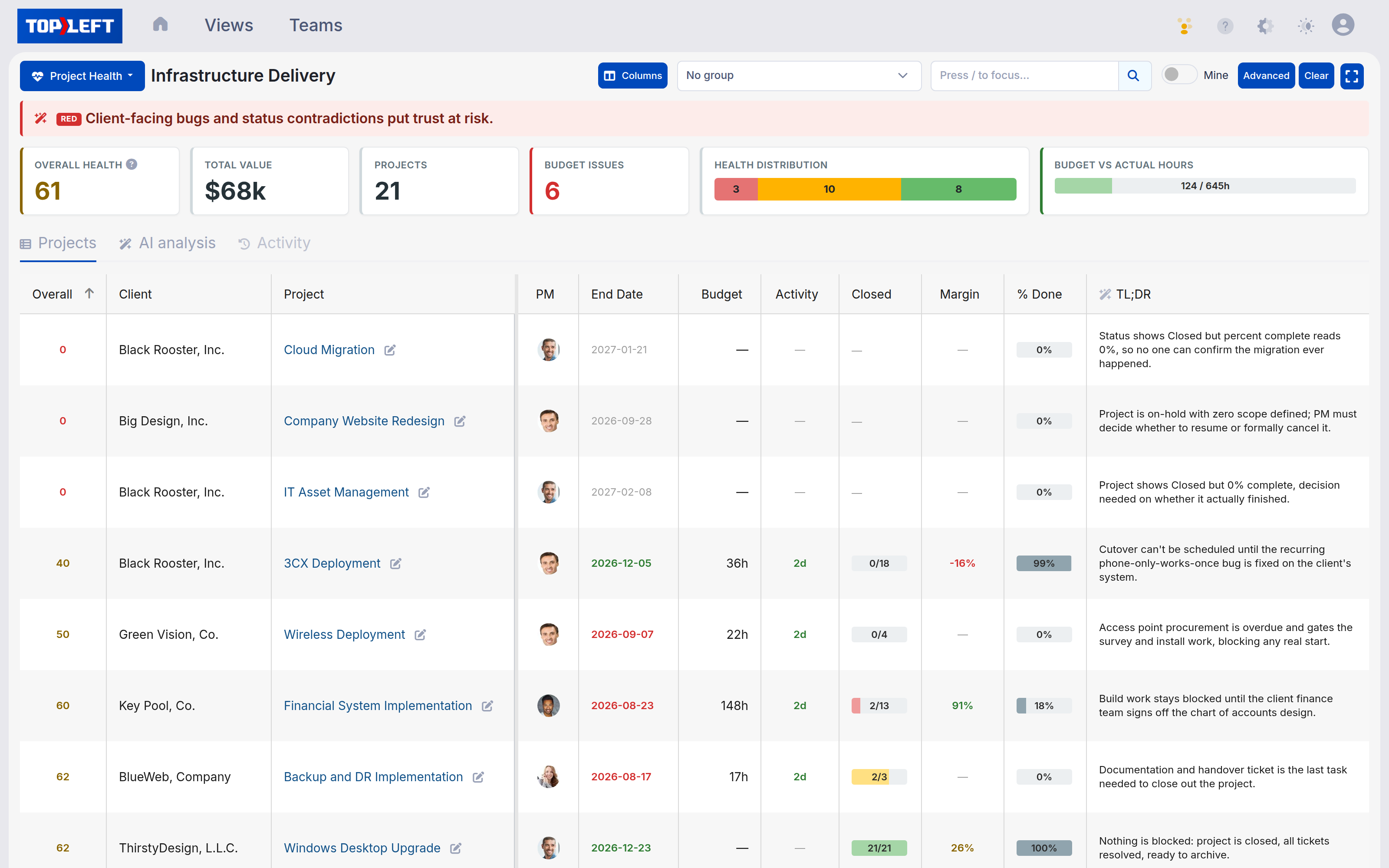


TopLeft is a visual project management layer for MSPs (managed service providers) that runs on top of ConnectWise, Autotask and HaloPSA. Project Health is the board that scores every project and explains the score.
You find out when the report runs.
A project stops moving. No time gets logged, no ticket changes status, and the project still shows as Active because nobody changed it. It comes up at the next quarterly business review (QBR), or when the client asks what happened to their cutover, and by then most of the budget has been spent.
Stalled projects
With forty projects and a few hundred open tickets, the ones that get attention are the ones a client is complaining about. A project nobody is complaining about can sit untouched for a month.
Budget overruns
Hours go on a project in small entries from several people. Nobody adds them up against the hours sold until invoicing, and by then the overrun is a conversation with the client instead of a decision.
Margin
A fixed fee, scope that grew, and a senior engineer's cost rate can turn a project that was priced well into one that loses money. The PSA does not show that number anywhere you would look at weekly.
The PSA records all of it. Nobody has time to read it every week.
Projects get stalled, and we don't know about it until we do our reports.
It looks like it's profitable, then people move on.
“I've owned my MSP for over 19 years. The Project Health dashboard shows exactly what our clients have been asking for, and what would have helped me when I was actively managing IT projects with ConnectWise Manage.”
Scored from the data you already have.
It reads the PSA data TopLeft already syncs.
TopLeft syncs your projects, tickets, time entries, phases and cost rates. Project Health scores from that copy, so there is no extra load on the PSA. Statuses and budgets can be edited in place on the board, and those edits push back to the PSA.
Six checks score every project.
Schedule
Past its end date with open work, or further behind than the calendar says.
Budget
Hours logged against hours sold.
Activity
Days since any open ticket moved. Red after fourteen.
Completion
Tickets closed against tickets total.
Margin
Revenue less cost, using the project's billing method and each member's cost rate.
Milestone
A phase past its planned end, or due within a week.
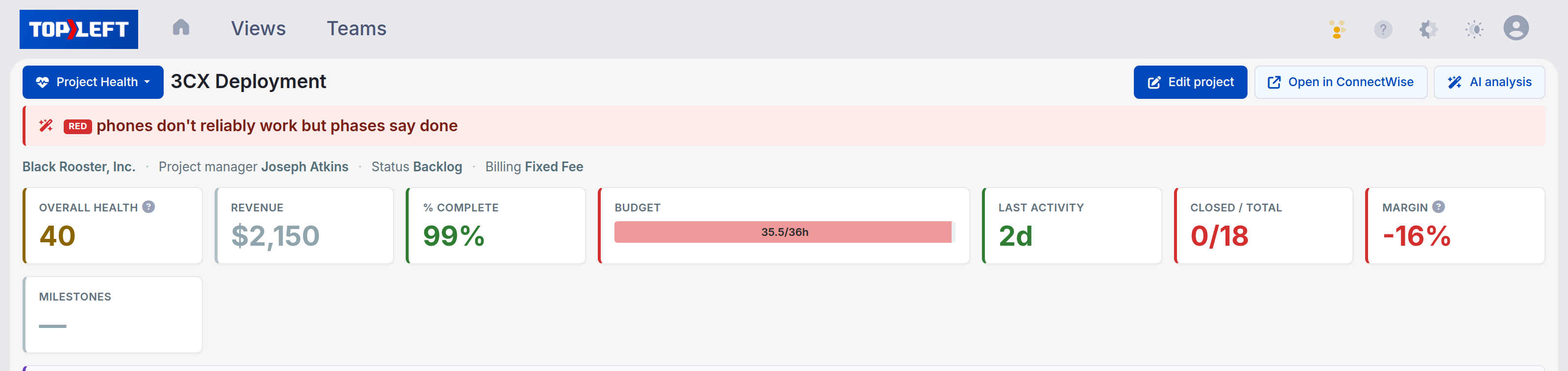
Each check shows the reason behind its colour when you hover over it. The six roll up into a score out of 100. A check with no data is grey and left out of the score, so a project without cost rates synced is not marked down for it. Next to the budget there is a forecast of hours at completion.
An AI review explains what to do.
The review gets the raw facts rather than our score, and is asked to look for places where the facts disagree: 85% complete but half the tickets still open, status Active but no hours logged in a month, a phase marked done with tickets still in it, a fixed fee with more hours still needed than were sold. Where the tracking is too inconsistent to trust, it says so and makes fixing the tracking the first action.
It reads both the structured data (budgets, dates, assignments, the work breakdown structure and its dependencies) and the text your team writes in notes and time entries, and pulls blockers and next steps out of what people actually wrote. It also critiques how the project is being run against project management practice, PMBOK (the Project Management Institute's guide to project management) and Agile (working in short cycles and adjusting as you go; it suits service and project teams, not only software) principles included.
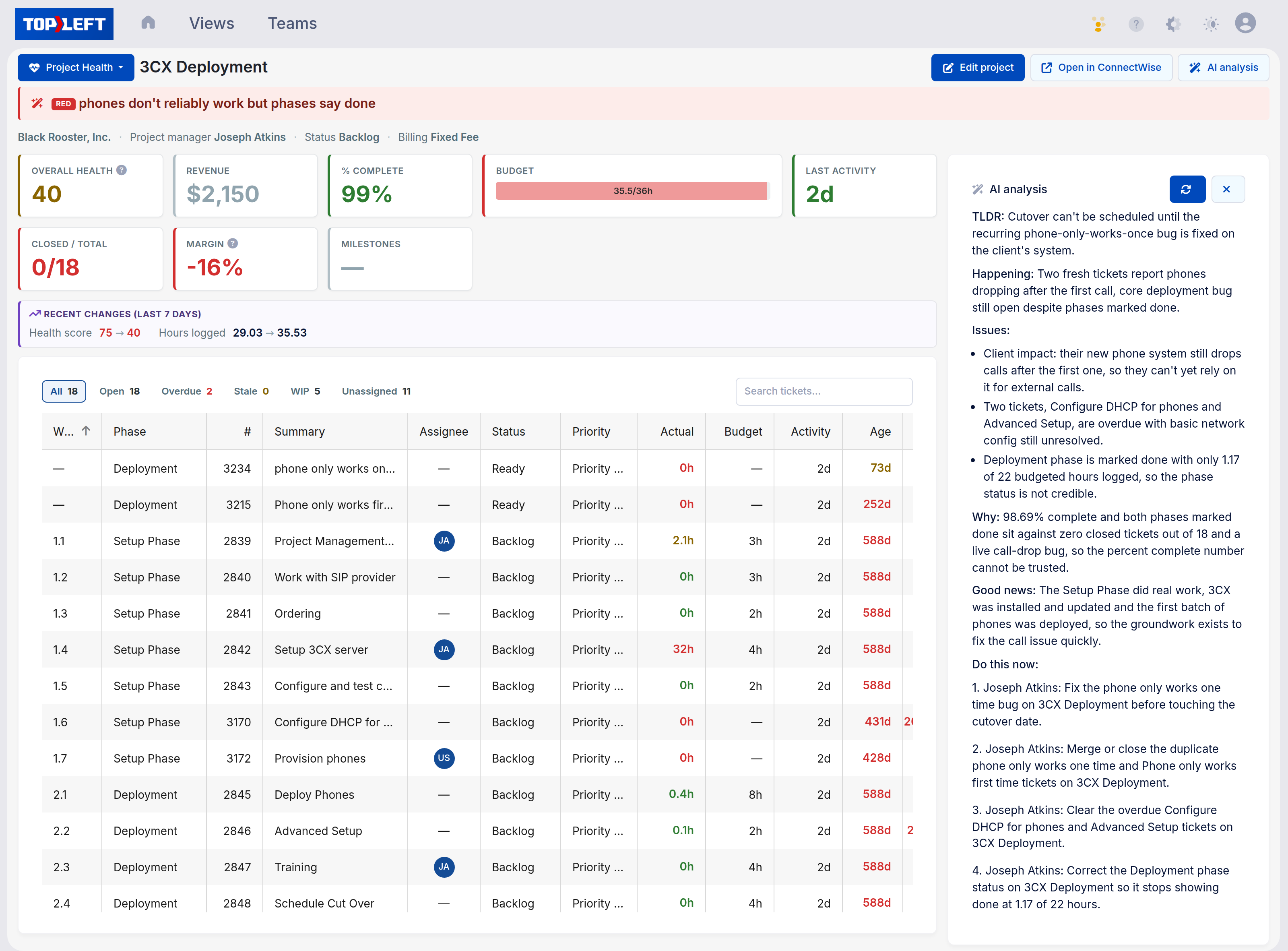
Red Phones don't reliably work but phases say done.
TLDR: Cutover can't be scheduled until the recurring phone-only-works-once bug is fixed on the client's system.
Issues:
- Client impact: their new phone system still drops calls after the first one, so they can't yet rely on it for external calls.
- Two tickets, Configure DHCP for phones and Advanced Setup, are overdue with basic network config still unresolved.
- Deployment phase is marked done with only 1.17 of 22 budgeted hours logged, so the phase status is not credible.
Why: 98.69% complete and both phases marked done sit against zero closed tickets out of 18 and a live call-drop bug, so the percent complete number cannot be trusted.
Do this now:
- Joseph Atkins: Fix the phone only works one time bug on 3CX Deployment before touching the cutover date.
- Joseph Atkins: Merge or close the duplicate phone tickets on 3CX Deployment.
- Joseph Atkins: Correct the Deployment phase status so it stops showing done at 1.17 of 22 hours.
The review from the screenshot, on demo data, with the Happening and Good news sections cut for space. A green project gets a few lines; an amber or red one up to two hundred words.
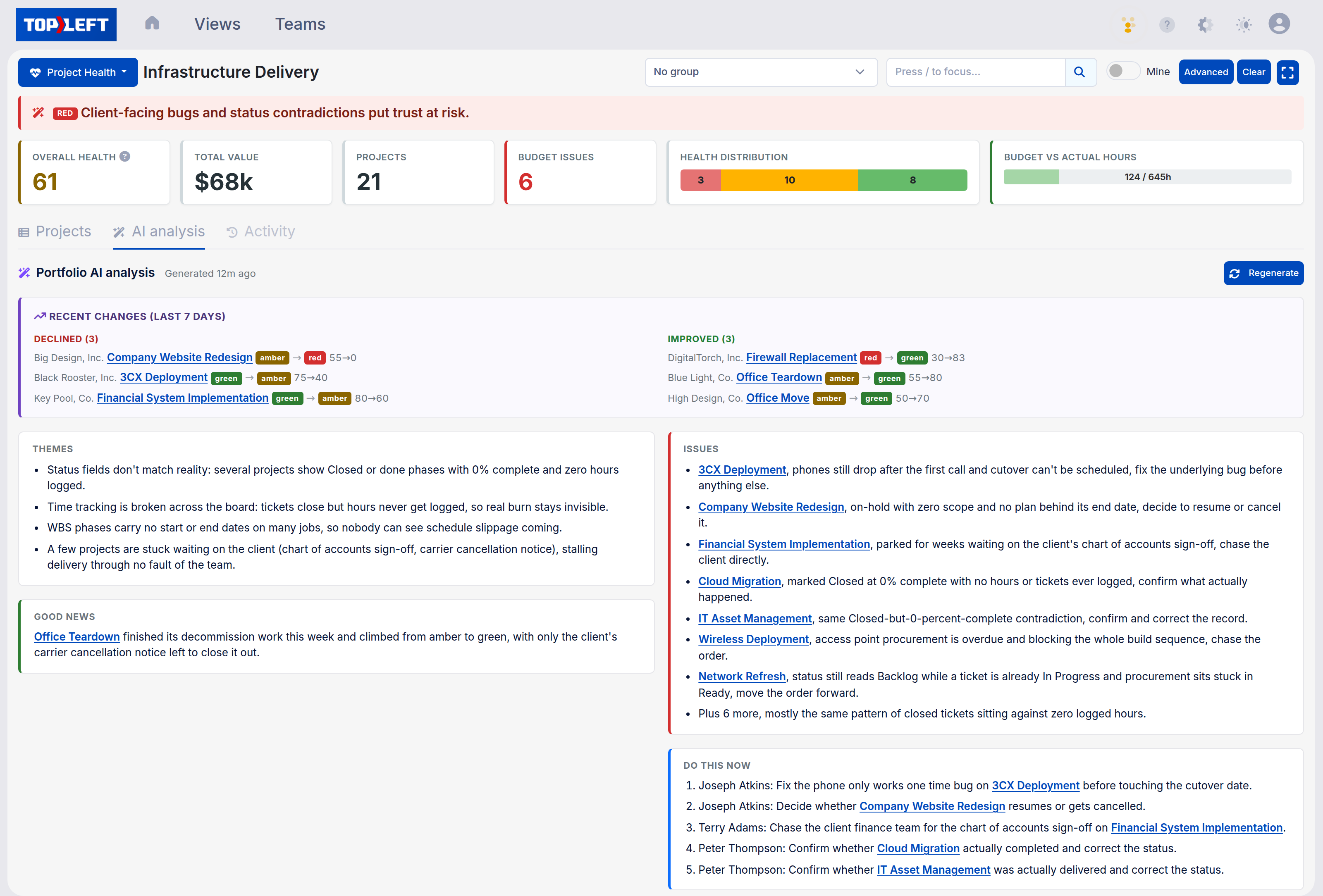
Then one review across the whole portfolio.
The portfolio review lists the themes across all projects, the projects that most need action in order with each one linked to its detail page, and three to five actions for the week. A separate card shows which projects declined, improved or are new since the last run, with the score change.
Reviews are refreshed overnight for projects whose data changed, and you can refresh one on demand. A one-line summary of each review appears as a column in the grid, so the whole portfolio can be sorted by it.
See it run on a demo portfolio.
In the demo we open a sample portfolio, run the review and go through what it says.
Monday morning, with and without it.
Without it
- Open the project list in the PSA and scroll through it.
- Start with whichever project a client has complained about.
- Ask the PMs for a status on the rest and wait for replies.
- Hear about the stalled one at the QBR.
With it
- Open the board. The projects that need attention are at the top, with the reason next to each.
- Read the actions in the review.
- Assign them.
- Spend the rest of the morning on something else.

Used by 700+ MSPs




What MSPs ask before they turn it on
Does Project Health write anything back to my PSA?
Which PSAs does it work with?
What AI is it, and where does my data go?
Can I keep client names and notes out of the AI?
Does the review read internal notes?
What does it cost, and who can see it?
Can I change the thresholds?
How is the overall score worked out?
Book a demo.
We talk through how you run projects today and show TopLeft in our demo environment, including a portfolio review. There is a 30-day money-back guarantee. If it isn't working for your team in the first 30 days, you get your money back.