













Discover your MSP’s true strengths and blind spots, and see what it’ll take to scale with higher margins, on-time projects, and a team that works in sync.




Your MSP Team Won't Adopt Azure DevOps Easily. Here's Why (And What They'll Actually Use)
Azure DevOps is built for software development teams shipping code. It handles version control, CI/CD pipelines, and automated deployments. What it doesn’t handle is the reality of MSP operations: billable time entry, SLA tracking, and keeping service tickets and project tasks synced with your PSA.
Try using it alongside ConnectWise, Autotask, or HaloPSA and you hit three walls. No native PSA integration means custom connectors or manual data transfer. Your techs work in two places. Clients can't see work status without custom development.
The result is friction that stalls adoption. Your team defaults back to PSA lists because that’s where their actual work lives.
TopLeft is built specifically for MSPs. Native PSA sync, unified ticket and project boards, and client portals included.
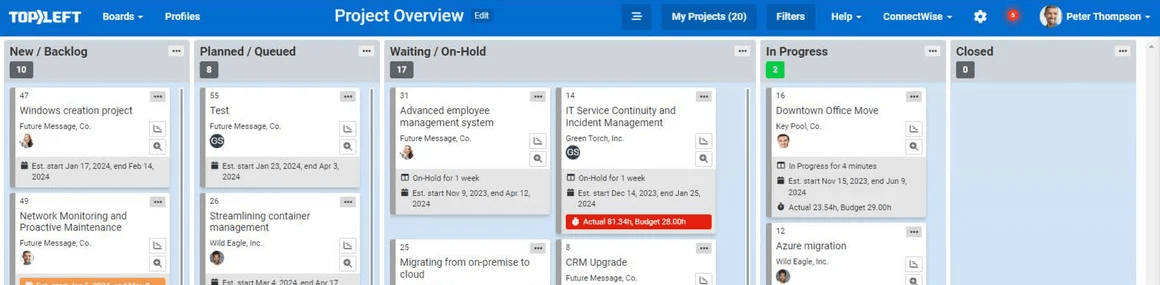
TopLeft is the right fit when your problem is operational visibility.
Your technicians are spread across service tickets and project tasks. Nobody can see who’s working on what. A senior engineer is buried in work while two others wait for assignments.
TopLeft shows every ticket and project task on one visual board, synced with ConnectWise, Autotask, or HaloPSA. Technicians pull their next priority without waiting for someone to assign it. Service managers can see overloads in seconds instead of finding out when an SLA slips.
TopLeft is the right fit when clients call daily asking for status updates.
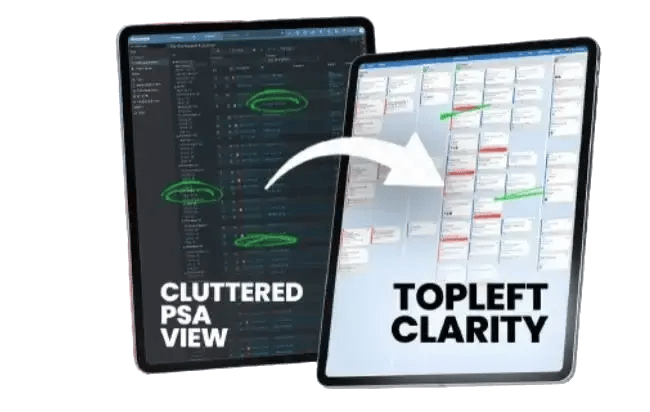
You’re spending hours every week answering “where’s my project?” calls and emails. Your team doesn’t have a clear view of capacity, so you commit to work before checking if anyone’s available to do it.
The native client portal shows clients their ticket and project status in real time. The built-in capacity view shows engineer availability against scheduled work before you make commitments.
Azure DevOps is the right fit for software development teams.
Your team writes code all day. You need version control, code reviews, test automation, and CI/CD pipelines. Your work items are features, bugs, and releases. You’re not managing client tickets or tracking billable time in a PSA.
Azure DevOps delivers sophisticated CI/CD capabilities and marketplace integrations when your business is shipping software releases.
Azure DevOps is the right fit for enterprise development shops running Agile sprints.

Your core workflow is sprint planning, backlog grooming, and continuous deployment. You have DevOps engineers who maintain the infrastructure. You’re already invested in the Azure ecosystem.
Connecting Azure DevOps to your PSA requires custom development work and ongoing maintenance, and it still misses the realities of MSP operations like billable time entry, SLA tracking, and a two-way synchronization between your PSA and Azure.
TopLeft is the right fit when your problem is operational visibility.
Your technicians are spread across service tickets and project tasks. Nobody can see who’s working on what. A senior engineer is buried in work while two others wait for assignments.
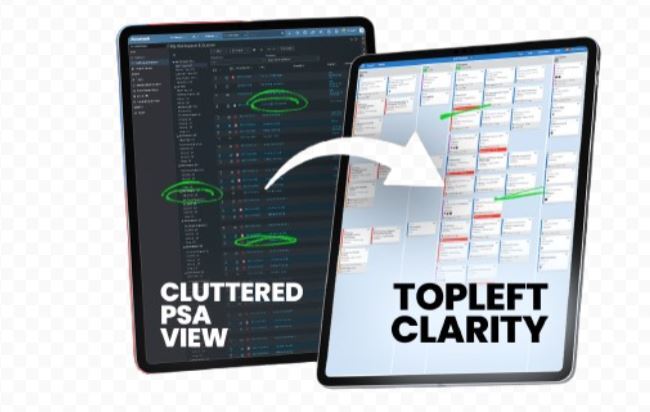
TopLeft shows every ticket and project task on one visual board, synced with ConnectWise, Autotask, or HaloPSA. Technicians pull their next priority without waiting for someone to assign it. Service managers can see overloads in seconds instead of finding out when an SLA slips.
TopLeft is the right fit when clients call daily asking for status updates.
You’re spending hours every week answering “where’s my project?” calls and emails. Your team doesn’t have a clear view of capacity, so you commit to work before checking if anyone’s available to do it.
The native client portal shows clients their ticket and project status in real time. The built-in capacity view shows engineer availability against scheduled work before you make commitments.
Azure DevOps is the right fit for software development teams.
Your team writes code all day. You need version control, code reviews, test automation, and CI/CD pipelines. Your work items are features, bugs, and releases. You’re not managing client tickets or tracking billable time in a PSA.
Azure DevOps delivers sophisticated CI/CD capabilities and marketplace integrations when your business is shipping software releases.
Azure DevOps is the right fit for enterprise development shops running Agile sprints.
Your core workflow is sprint planning, backlog grooming, and continuous deployment. You have DevOps engineers who maintain the infrastructure. You’re already invested in the Azure ecosystem.
Connecting Azure DevOps to your PSA requires custom development work and ongoing maintenance, and it still misses the realities of MSP operations like billable time entry, SLA tracking, and a two-way synchronization between your PSA and Azure.



We manage a lot of Projects (40–60 at a time) and TopLeft has proven to improve focus and save time capturing critical information needed to keep projects on schedule!
— Frank Hannaford
Solutions Architect
at CoreTech
We transitioned from ConnectWise Manage to TopLeft for better ticket management. And we have improved SLA adherence from 60% to 90% within six months
— Chase Effler
Engineering Manager
at Appalachian Network Services Inc.