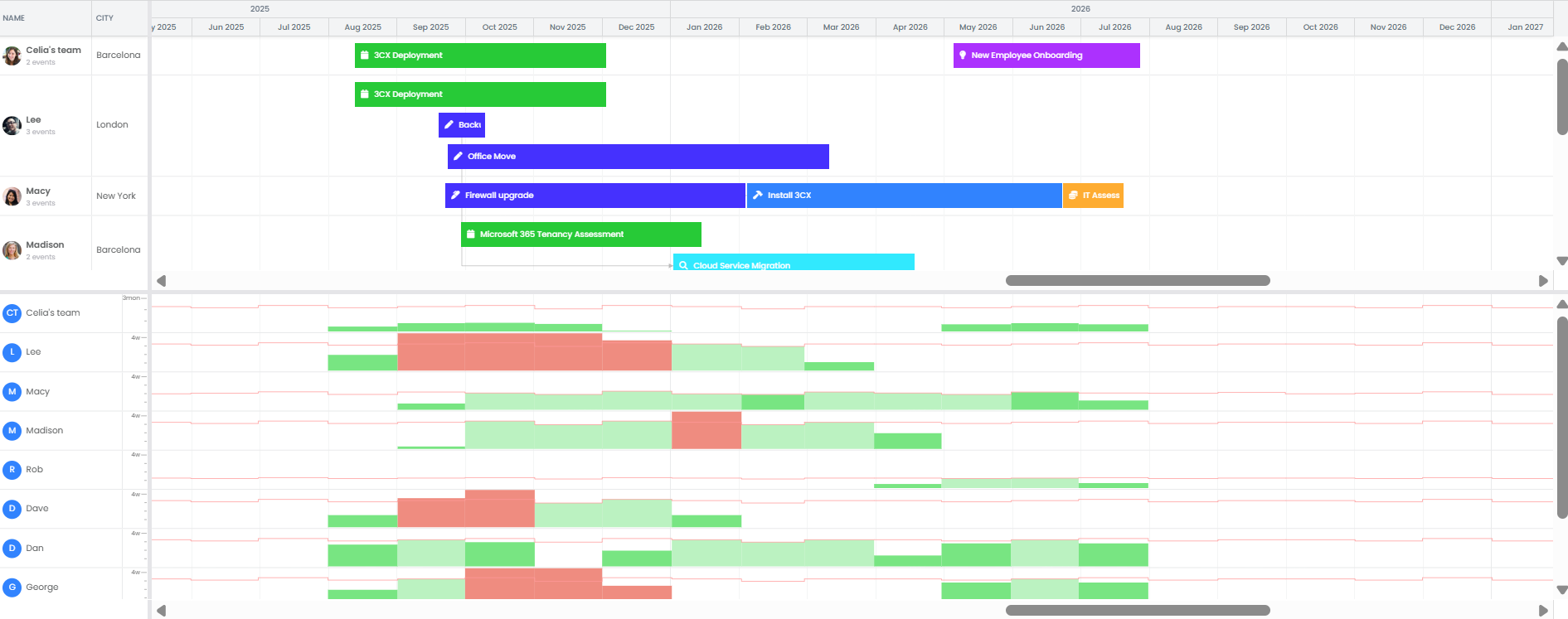
Project Capacity Planning: Give clients realistic dates
You commit 2 weeks to start a project, and 3 to complete... but then it slips to 10 weeks. See true capacity using your existing PSA data, without having to re-enter into Excel or MS Project.
“It's a guessing game. We're throwing a dart at the wall and hoping it sticks.”
MSP owner, discovery call, 2025
Works with ConnectWise, Autotask, and HaloPSA.

“This is the best view for capacity planning that I've had so far.”
TopLeft customer, Accelerator coaching call, 2026
See when the next project fits, before you say yes
Every engineer's project load, week by week, three months out. When sales asks if the next one fits, the answer is a week on the chart, not a guess.
Visual Team Capacity View Compare assigned project hours against each engineer's actual available hours every week so you know who is working on what.
Overload Heatmaps Red bars show who's scheduled for more hours than they can work. Green shows who has room.
Capacity Per Person, Per Week Give each engineer the hours they can actually give to projects, and drop them for a vacation week or a training block.
Tell clients the truth about project timelines
Check which engineer you'd put on the project before setting expectations.
- Slide a project to a later week and watch who frees up, before you tell the client.
- Plan work by the week, not by the hour.
- Try it in a draft. Nothing reaches your PSA until you press Save.
Setup takes 15 minutes, not a project
Give the team a default, such as 40 hours a week. Give each engineer their own number, say 20 hours for projects with the rest left for tickets. Then adjust single weeks as required for vacation, training and so on.
Our onboarding team will walk you through it during the onboarding call.
Frequently Asked Questions
Add them as projects in your PSA. They don't need a full ticket breakdown, just a budget and team members.
Project budgets are in hours, which is what the plan spreads across each project's dates. Dollar billing amounts are not part of the capacity view.
Unlike other tools that save immediately, you can drag projects around, change assignments and adjust hours. Nothing saves to your PSA until you explicitly tell it to.
If projects have multiple phases separated by time or different effort requirements, you can do phase-level capacity planning as well.
You can set up different views for different teams, just like you probably already do with your Kanban boards. The network team plans their work, the infrastructure team plans theirs, and you can see everything together when needed.